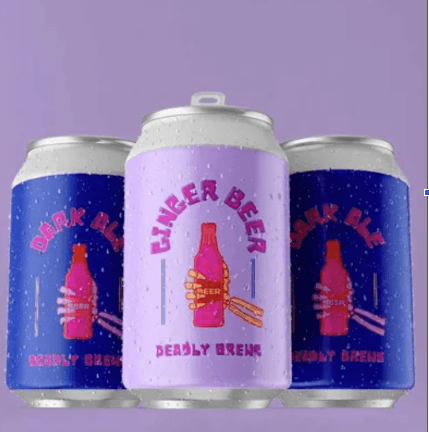
Most people who order custom labels for the first time have the same experience. They know what they want the label to look like. They’re less sure about everything else. What file format do they need? What material should they choose? How does the proof process work? And when the labels arrive on a roll, how do they actually get onto the product?
The custom label printing process is more straightforward than it sounds, but there are enough moving parts that understanding them before you start saves time, money, and the frustration of getting something back that doesn’t look the way you imagined.
Getting your artwork right before you upload
Everything downstream of this step depends on it. A label that looks sharp on your screen can print blurry, pixelated, or with colours that don’t match what you expected if the file isn’t set up correctly.
The most common issue is resolution. Screen graphics are typically set at 72 DPI, which is fine for digital display but not nearly enough for print. Labels need artwork at a minimum of 300 DPI at the intended print size. If you scale up a low-resolution file to fit a larger label, the quality doesn’t improve. It gets worse.
File format matters too. Vector files, typically PDF, AI, or EPS formats, are ideal because they can be scaled without any loss of quality. If you’re working with a raster image, make sure it’s a high-resolution TIFF or PNG rather than a compressed JPEG, which introduces artefacts that show up clearly in print even when they’re invisible on screen.
Colour mode is another area where people get caught out in the process of custom label printing. Screens display colour in RGB. Printers use CMYK. The two don’t map perfectly onto each other, which means colours that look vivid on a monitor can appear slightly different when printed. Converting your file to CMYK before submitting it gives you a more accurate sense of how the finished label will look.
Bleed is the last thing to check. Most label printers require around 3mm of bleed on each side of the design. This is extra artwork that extends beyond the cut line so that if the cutter runs slightly off-centre, there’s no white border appearing at the edge. If your design runs all the way to the edge of the label, bleed is not optional.
Choosing the right material for your product
Label material is not a one-size-fits-all decision. The right stock depends on where the product will be stored, how it will be handled, and what finish suits the brand.
Paper labels come in coated and uncoated options. Coated stock is smooth, prints with sharp colour reproduction, and is typically finished with gloss or matte laminate for protection. It’s a practical, cost-effective choice for a wide range of products including food, beverage, and retail goods. Uncoated stock has a textured surface that feels more natural and premium. It’s used heavily in wine and specialty food production where the tactile quality of the label contributes to the perception of the product.
Synthetic polypropylene labels are a different category entirely. These are waterproof and tear-resistant, making them the right choice for products that regularly come into contact with moisture. Anything that lives in a refrigerator, gets handled with wet hands, or is exposed to condensation during storage will hold up better with a synthetic label than a paper one. Products like sauces, beverages, cosmetics, and cleaning products are typical candidates.
Metallic labels use a foil-effect stock that creates a reflective, high-end finish without needing a separate foil stamping process. They suit premium products, gift packaging, and anything where shelf presence is a priority.
Getting the material wrong is one of the more expensive mistakes you can make, because you won’t know it’s wrong until the labels are already on the product and something starts peeling, smearing, or looking soft after a week in the fridge.
See also: How to Secure Your Smart Devices
How the proofing process works
Once you’ve uploaded your artwork and selected your size and material, the next step is reviewing a proof. This is a digital render of how your label will look when printed, and approving it is the point of no return before production begins.
Take the proof seriously. Check every element. Confirm that fonts have rendered correctly and nothing has shifted position. Verify that colours look close to your expectations given the CMYK conversion. Check that nothing important sits too close to the cut line where it could be trimmed. Look at the overall proportions and make sure the label will sit correctly on your bottle, jar, or packaging.
Some online label printers allow real-time proofing directly in the browser, which means you can see the effect of changes before you commit. This is considerably faster than the older method of submitting a file, waiting for a proof to be emailed back, requesting changes, and waiting again.
Approve the proof only when you’re genuinely satisfied. Production begins immediately after approval, and changes after that point typically aren’t possible without starting the order again.
Production timelines and what affects them
Standard production times for custom labels run between three and five business days from the point of proof approval. Some orders are completed faster. Some take slightly longer depending on volume, complexity, and current production load.
A few things can slow the process down. Artwork that needs correction before it can go to press adds time. Queries about size or specification that require back-and-forth communication add time. Ordering during peak periods, such as the lead-up to Christmas, adds time. If your labels are for a specific event or product launch with a fixed date, ordering earlier than you think you need to is always the right call.
Shipping is typically included in the label price and moves quickly once the order leaves the printer. Labels are dispatched on rolls rather than sheets, which makes them easier to handle and apply whether you’re using a label applicator machine or doing it by hand.
Labels on rolls and why it matters for application
All labels arriving on rolls is a practical detail that’s easy to overlook until you’re standing at a bench with 500 bottles to label.
Roll format works with both automatic label applicators and manual hand application. For small-batch producers or businesses just starting out, hand application is the reality, and a roll is far easier to work with than sheets. You unwind the roll, peel the label from the backing, and apply it cleanly to the surface. There’s no cutting, no separating individual sheets, and no fumbling with flat stacks of labels that shift around.
For businesses that have moved to a semi-automatic or fully automatic labelling line, roll format is a requirement. Applicator machines are designed to work with rolls of a consistent diameter and core size. Confirming these specifications with your printer before ordering ensures the labels will feed correctly through your equipment without jams or misalignment.
Surface preparation and getting a clean application
The label is only as good as the surface it goes onto. This sounds obvious but it’s the step most often skipped.
Bottles, jars, and packaging need to be clean and completely dry before labelling. Dust, oil residue from handling, and even slight moisture all reduce adhesion. On glass bottles that have been stored in cold conditions, condensation on the surface is a real problem. Let the bottles come up to room temperature before applying labels, or wipe the surface with a clean dry cloth immediately beforehand.
Consistent pressure during application helps prevent air bubbles and lifting edges. On curved surfaces like wine bottles, applying the label from the centre outward and using a firm, even pressure across the full label face gives the cleanest result.
The adhesive on most paper and synthetic labels is permanent, which means repositioning after application is rarely possible without damaging the label. Getting alignment right on the first attempt matters, and for anyone doing high volumes by hand, a simple positioning guide or jig can save a lot of time and wasted labels.